Reduce churn risk

Reduce customer churn: know what accounts still need

To reduce customer churn, know what each account asked for and whether you delivered before renewal. UserVoice puts every account's requests, revenue, and statuses in one place.
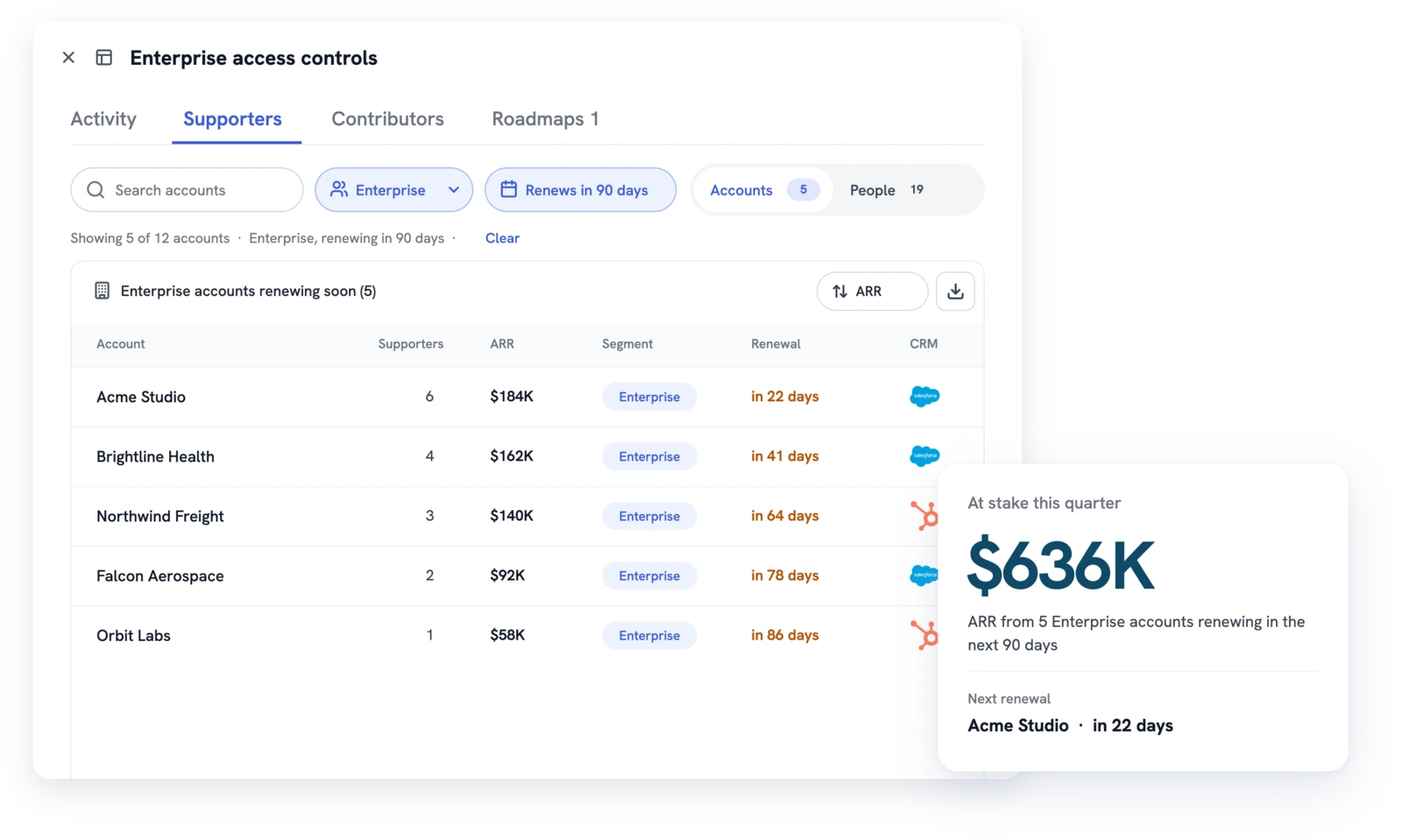
UserVoice supporters of an idea filtered to enterprise accounts renewing in 90 days, with ARR at stake this quarter

What users say on G2

Read all 240+ reviews on G2
It's then incredibly easy to contact those users when we're working on that feature or need additional information.
Taylor J.
User Experience Researcher, Mid-Market, verified review on G2
The ability to update the internal or external status of any feedback is great, with the ability to specify and email those that have voted for an item.
Josue T.
Mid-Market (51-1,000 employees), verified review on G2
Unresolved requests

See what an account is still waiting on

Customers rarely churn over one missing feature. They churn when they asked, heard nothing, and stopped believing anyone was listening. Before a renewal, filter the Idea Status Board to one account. Every idea its users support shows in columns by status, so you see what's open, planned, and shipped at a glance. Share the filtered board as a link with the account team.
  • Filter the board by Supported by to one account
  • Account pages show users, supported ideas, and revenue
  • Account Insights lists an account's open ideas, closed ideas, and activity
  • Flags mark what matters to an account, with a reason only your team sees
  • Each customer's own words stay on the idea
Explore Account Insights →
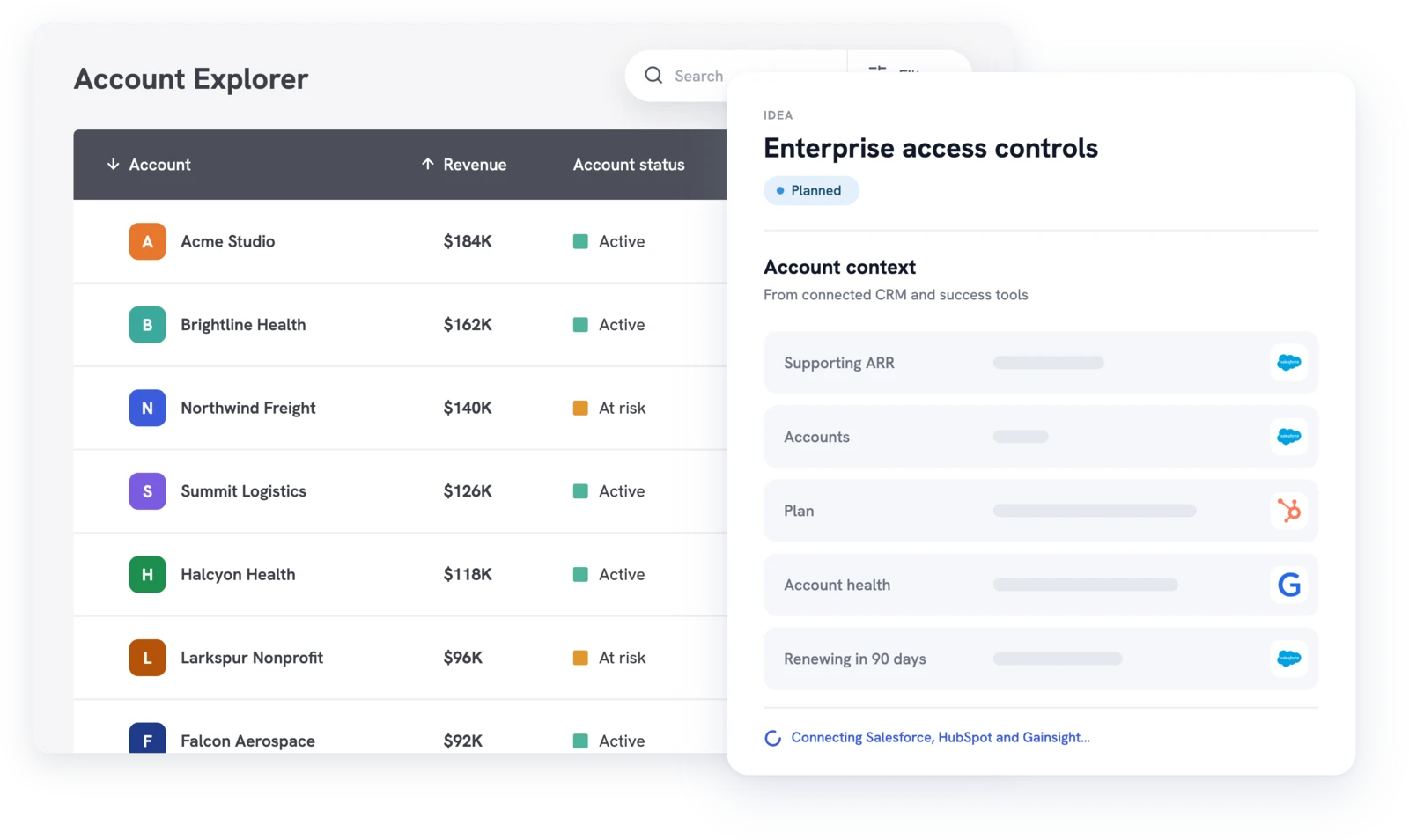
UserVoice Account Explorer with an account's supporting ARR, plan, health, and renewal date from connected CRM tools
Outcomes

Walk into every renewal with an answer

What changes when every renewal starts from the account's own requests.
No surprises at renewal
The account team knows every open request before the call, and can show what already shipped.
Retention work gets prioritized
Product sees which requests many renewing accounts share, with the revenue behind them.
Customers see follow-through
Status emails show customers their feedback went somewhere, long before the renewal conversation.
Where to look

Signals to watch to reduce customer churn

UserVoice doesn't score churn risk. It shows the signals your team reads before deciding which renewals need attention. For more on the gap these signals fill, see the retention signal gap.

Signal
Where you see it in UserVoice
What to do next
Open requests from a renewing account
Idea Status Board filtered to the account, or its account page
Bring an answer for each one to the renewal call
Requests many Active accounts share
Account Insights filtered to Active, ranked by accounts or revenue
Make the case to product with the revenue attached
A request that matters to a key account
An internal flag with your team's reason
Raise it in planning before the renewal
Requests that waited too long for an answer
Ideas with no status change in months, found with the agent
Post a status update, even if the answer is no
What you already delivered
Closed ideas on the account, and the Activity Report
Show the customer what shipped for them
Health score and renewal date
Your CRM fields, or Gainsight (paid add-on), read by the agent and MCP
Decide which accounts to review first
Shared needs

Find the needs that reduce customer churn across accounts

One account's request is a conversation. The same request from many renewing customers is a priority. With Salesforce or HubSpot connected, Account Insights focuses on Active accounts and ranks ideas by how many support them and how much revenue they carry.
  • Filter by account status: Active, Churned, Prospect, or Closed-Lost
  • Chart ideas by supporting accounts or revenue
  • Break support down by plan, segment, and industry
  • Sort the idea grid by the revenue behind each idea
Explore customer feedback scoring →
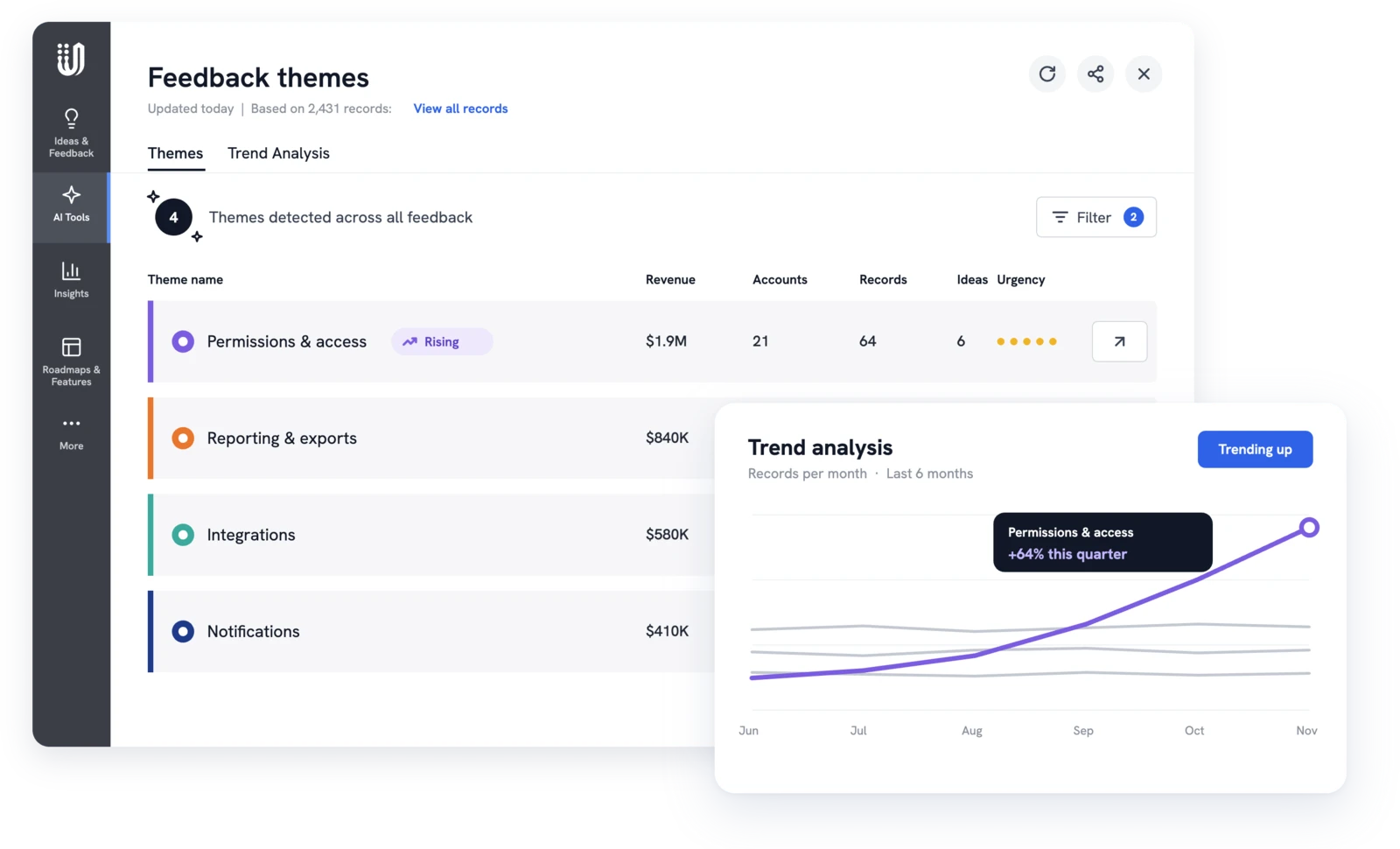
UserVoice feedback themes with revenue and accounts, and a trend chart flagging a rising theme
Follow-through

Close the loop before the renewal call

Agree on a response with product, then tell the customer what changed. When you post a public status, you choose whether to email the idea's subscribed supporters. Anyone who captured feedback on the idea is emailed either way, so the account team knows to follow up.
  • Public status updates with a message customers can read
  • Internal status updates explain decisions to the account team
  • The Activity Report counts accounts affected and revenue addressed
  • Statuses stay with the idea for the next renewal
Explore customer communication →
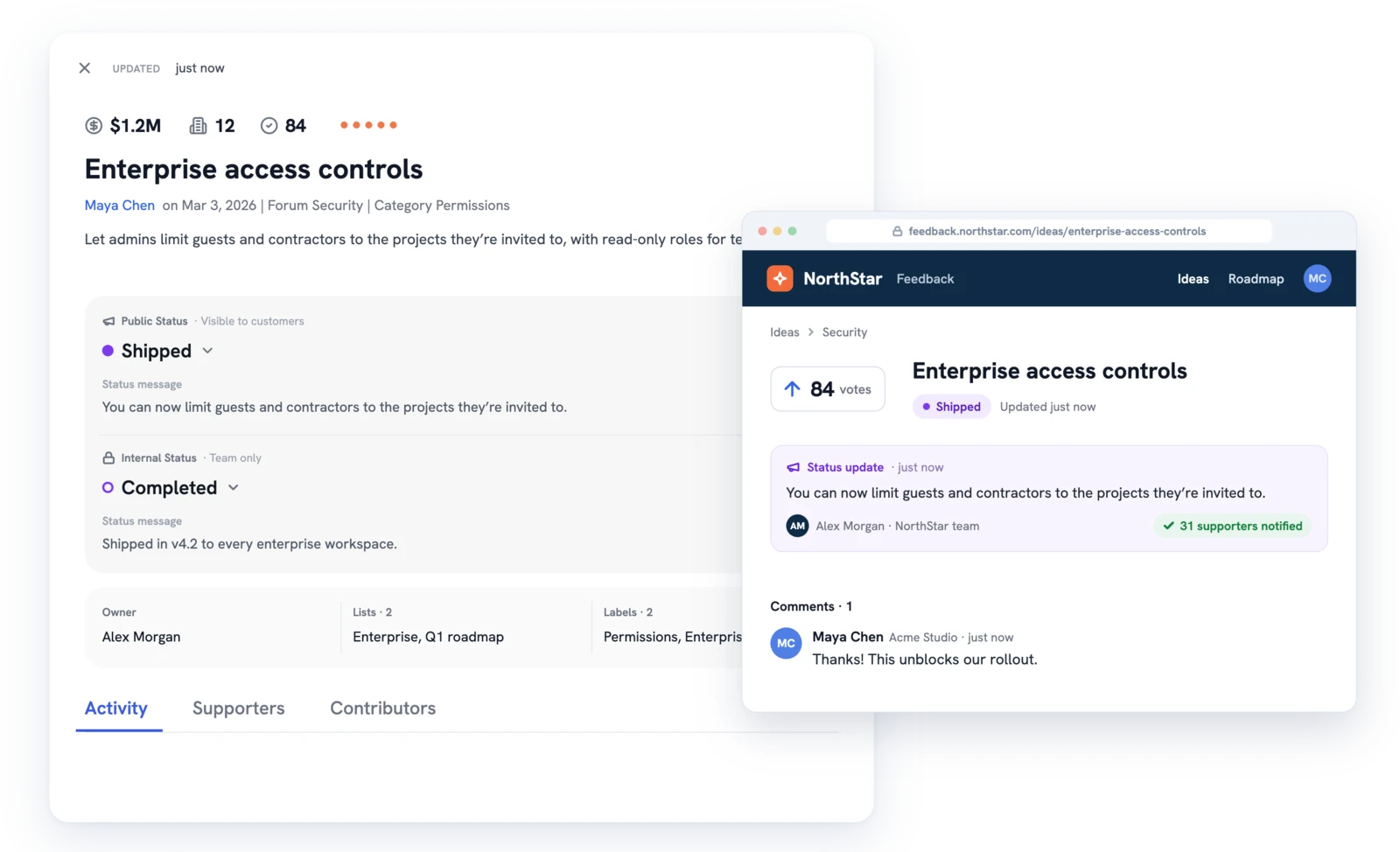
UserVoice idea marked Shipped next to the customer portal showing the status update and a customer reply
Before every renewal

A renewal prep routine your team can repeat

The same three steps work for every renewal, whether you run them by hand or ask the agent.

01

Find who's renewing

Ask the agent which accounts renewing in the next 90 days support open ideas, using a renewal date synced from your CRM.

02

Review each account

Filter the Idea Status Board to the account. Check what's open, planned, and shipped, and read your team's flags.

03

Follow up before the call

Agree on a response with product, then post the status update. The Activity Report shows the accounts it reached.

By role

Every team helps reduce customer churn

Retention is shared work. Each team does its part from the same account view.

Customer success
CSMs check an account's board before every call and capture new requests with the Chrome extension. See the renewals guide.
Product teams
PMs see which open ideas Active accounts share and weigh them against new work. Product teams read why each customer cares.
Account managers
AMs read internal statuses before a renewal, so they explain decisions without promising a date. See customer feedback for customer success.
Revenue leaders
Revenue teams see how much renewing revenue sits behind open requests, using account revenue from the CRM.
Support teams
Agents link tickets to ideas and subscribe customers, so a status email answers the next ticket. See the Zendesk integration.
Executive teams
Executive teams see which unmet requests carry the most account revenue and fund the work that protects it.
Customers

Teams that show customers they were heard

UserVoice helps us turn customer feedback into shared intelligence across the business. As more teams engage, we get stronger insights, better analytics, and real momentum toward embedding the customer voice into our decision-making.

Ariana Newton, Product Operations Manager at Optimizely

Ariana Newton

Product Operations Manager @ Optimizely
We can quickly surface a complete, data-backed view of every client interaction (questions, feedback, and responses) and turn that into clear insights for renewals. It shows customers we’re listening and acting on what they tell us.

Kathryn Doebler, Director of Product Operations at Freewheel

Kathryn Doebler

Director of Product Operations @ Freewheel
There are a lot of problems to solve out there, and spending time on something that isn’t the most impactful for our users is heartbreaking. UserVoice challenges me to look at the overall picture of the struggles that our customers as a whole.

Megan Fangmeyer, Product Manager at Facts

Megan Fangmeyer

Product Manager @ Facts
AI and MCP

Prep for any renewal in one message

The UserVoice agent answers in the admin console. The UserVoice MCP server brings the same questions to your own AI assistant. Both follow each admin's permissions.

Open requests
Walk in knowing what's open. See the MCP playbook.
What open ideas does Acme support? Link each one.
Across your book
See risk across renewals, using a renewal date synced from your CRM.
Which accounts renewing in the next 90 days support ideas still under review?
Wins to share
Show the account it was heard. Health and renewal date can come from Gainsight, a paid add-on.
Which ideas has Acme supported that we completed this year?

Reduce customer churn: your questions, answered

Does UserVoice predict churn?

No. UserVoice shows what each account asked for, its revenue, and what happened to its requests. Your team decides whether an unmet need puts a renewal at risk.

Can we focus on paying customers?

Yes. With Salesforce or HubSpot connected, Account Insights filters by account status, so the view reflects your Active customers.

Do we need Gainsight?

No. Account status and revenue come from Salesforce or HubSpot. Gainsight, a paid add-on, adds health score, stage, and renewal date for the agent and MCP to use.

Do customers get an email when their idea moves?

When you choose to notify supporters, subscribed customers get one. The teammate who captured their feedback always does.

Can we track renewal dates?

Yes. Sync a renewal date from your CRM as a custom field, then ask the agent which renewing accounts support open ideas. See the CRM sync guide.

Keep exploring

Go deeper where it matters

Walk into every renewal prepared

Get a free 30-day trial after your demo, see your own customer feedback in a real account.

Book a demo