Running a Beta Program in UserVoice
Collecting structured feedback from a hand-picked group, then folding it into your main forums.
On this page
A beta is only as useful as the feedback you get back from it. When beta feedback lives in email threads and call notes, it is hard to see what testers agree on, and the results rarely reach the rest of your roadmap. A private beta forum in UserVoice gives testers one place to post, vote, and comment, and lets you carry what you learn into your main forums when the beta ends.
Why run your beta in UserVoice
A private beta forum gives testers one place to post, vote, and comment, gives your team structured answers, and keeps everything you learn when the beta ends.
Testers post ideas, vote, and comment in a forum only they can see. Your team sees every piece of beta feedback together, instead of across inboxes and calls.
Questions you ask only in the beta forum collect the context you need, such as which build a tester is on, in the same shape every time.
Statuses, comments, merging, and voting work in the beta forum exactly as they do everywhere else, so your team doesn't learn a new process.
When the beta ends, ideas move into your main forums with their votes, comments, and feedback attached. Nothing is retyped.
Private forums and some features in this guide depend on your plan. Your UserVoice rep can confirm what your plan includes.
Setting up the beta forum
A beta forum is a regular forum set to private, with a welcome message and prompt written for your testers.
- Create a forum for the beta and add categories for the areas you want feedback on. To make every idea land in an area, turn on Require a category.
- Under Set Forum Visibility, choose Make it private.
- Under Portal Forum Settings, write a welcome message that explains what the beta covers, and change the prompt to match, for example “What should we change about the new editor?”
- If you want testers to rate how much each idea matters to them, turn on the Importance Scale for the forum.
New forums start out public. Set the beta forum to private before you add ideas or send invitations.
Inviting testers
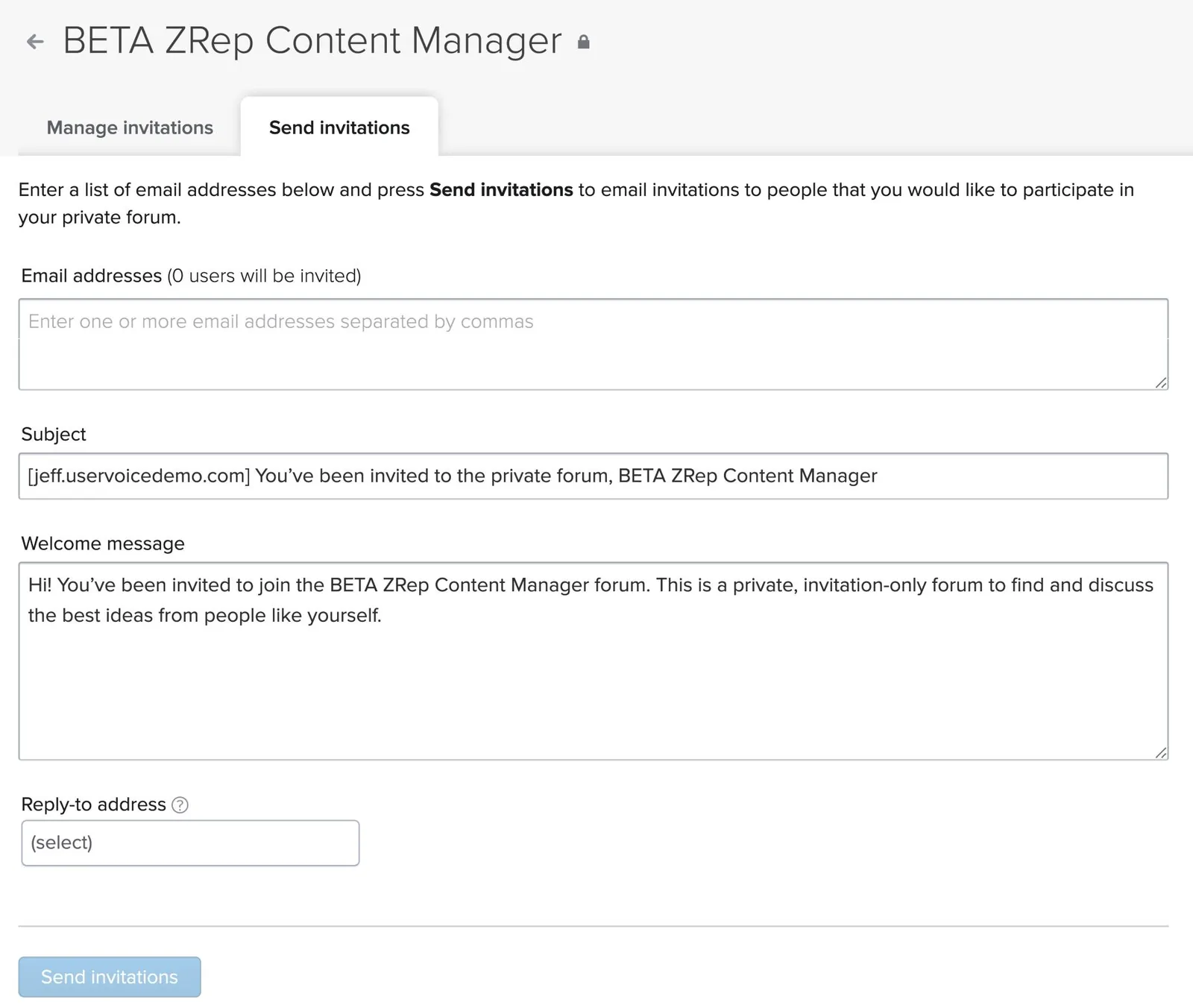
From the forum's visibility settings, open Manage authorized users and go to Send invitations.
- Paste the testers' email addresses, separated by commas.
- Edit the subject and the welcome message. The default message explains that the forum is private and invitation-only.
- Add a reply-to address so testers can answer you directly.
- Select Send invitations.
What testers see
| Tester | What happens |
|---|---|
| Already has a confirmed account on your portal | Gets access as soon as the invitation is sent |
| New to your portal | Gets an email with a link to create a profile and claim the invitation |
| Signs in through your single sign-on | Is sent to your sign-in page from the invitation link |
The Manage invitations tab shows which invitations are claimed, and lets you resend or delete each one.
Deleting an invitation removes that grant only. If the forum also allows an email domain or single sign-on users, someone whose invitation you delete can still get in that way. For an invite-only beta, rely on invitations alone.
Asking the right questions
Custom questions turn every beta idea into a structured record. Scope them to the beta forum so they never appear on your main forums.
| Question | Format | Why ask it |
|---|---|---|
| Which version or build are you using? | Single select | Ties each idea to the release it came from |
| Which platform are you on? | Single select | Separates platform-specific issues |
| How often do you use this feature? | Single select | Weighs feedback from daily users against occasional ones |
| What were you trying to do? | Short text | Captures the goal behind the idea |
Set each question's response visibility to Admins only unless testers benefit from seeing each other's answers. Under Which forum?, choose Specific forums and pick the beta forum.
Ask two or three questions, and require at most one. Testers are doing you a favor, and a short form keeps them posting.
Running the beta
Use internal statuses for beta triage
Statuses are shared across all your forums, so a public status named for the beta would show up everywhere. Track beta-specific steps, such as Reproduced or Fixed in next build, with internal statuses, which only your team sees. Post public status updates when testers should hear about progress.
Follow up with testers
On any idea, Email users sends a message to everyone subscribed to it. Use it to ask a follow-up question or share a fix.
Watch the whole beta at once
Filter the idea list to the beta forum to sort its ideas by votes, and use Idea Insights with the Forum filter to see activity over the course of the beta.
Merge duplicates as they come in. When two testers report the same thing, merge the ideas so votes and comments add up on one idea.
Wrapping up the beta
- Change the forum to Comment Only. Testers can still comment, but no new ideas, votes or importance ratings come in.
- Post a final status update on the ideas you are acting on, so testers hear what happened.
- Move the ideas that belong on your roadmap into your main forums, using Move in the idea list. Pick a category in the destination forum.
- Merge any beta idea that duplicates an idea already in your main forums.
Moved ideas keep their votes, comments, captured feedback, subscribers, and status. If you move ideas by mistake, you can undo the move.
Moving an idea to a public forum makes its beta history public. Its comments and voters become visible to everyone who can see the destination forum. Review comments before you move an idea out of the beta.
Deleting a forum deletes its ideas. Move everything you want to keep first. Keeping the beta forum in Comment Only is a simple way to archive it.
Try it with your AI assistant
1 of 4 prompts in the PDFAttach the PDF to Claude, ChatGPT, or another assistant, then paste:
Using the UserVoice guide I attached, help me plan a beta for [feature]. Ask me about the testers, timeline, and what we need to learn first, then draft the forum setup, welcome message, and prompt.
Three more prompts and the checklist are in the full guide. Get it by email →
Read next
Get the full guide
We'll email you the 11-page PDF. It adds three things that aren't on this page: