Strategies for Forums, Categories, and Labels
Build a taxonomy around your product, in terms your customers understand.
On this page
Every idea in UserVoice lives in a forum, can sit in a category, and can carry any number of labels. Used well, the three give customers an easy way to post, give each product manager their own view, and let your team slice feedback any way it needs. This guide explains what each tool is for, how to design each one, what not to encode in them, and how to change your setup later.
Three tools, three jobs
Forums, categories, and labels each answer a different question. Most taxonomy problems come from asking one of them to do another's job.
| Forums | Categories | Labels | |
|---|---|---|---|
| Answers | Where does this idea live, and who can see it? | Which part of the product is it about? | What does our team need to know about it? |
| Who sees it | Customers, if the forum is public | Customers, on the portal | Your team only |
| Who sets it | The submitter picks a forum, or arrives in one | The submitter picks one, if any | Your team, with AI recommendations if you have the add-on |
| Per idea | Exactly one | One or none | As many as you need |
| Spans | One audience or product line | One forum | Every forum, or only the ones you choose |
Forums for audiences, categories for customers, labels for your team. If customers should see it and pick it, it is a category. If only your team cares, it is a label.
Designing your forums
A forum is the biggest container. Split forums by who is giving feedback, or by a product line distinct enough to have its own team.
| Split by | Example forums |
|---|---|
| Audience | Product ideas (public), Beta program (private, by invitation) |
| Product line | Web app, Mobile app, API and developer tools |
| Program | A beta or early-access program with an end date |
Keep the number small
Customers have to choose a forum before they post. A handful of clearly named forums keeps that choice easy and keeps votes for one need together. The portal opens on the forum you mark as the default.
Your team posts in the same forums as your customers. Admins and contributors add customer feedback to existing ideas, or post a new idea when it's original. A separate internal forum splits demand for the same need across two places.
Deleting a forum deletes its ideas. Move ideas to another forum first. To retire a forum without losing anything, switch it to Comment Only.
| Use | When |
|---|---|
| A forum | Product lines, audiences, programs, and languages run by one admin team |
| An instance | A group needs its own admins, statuses, brand, sign-in, or CRM. See When to Add Another UserVoice Instance. |
Designing categories
Categories are the product areas customers browse and choose from when they post. Design them for the customer, not for your org chart.
- Use the customer's words. “Reports and dashboards” beats “Analytics platform team”.
- Keep each list short. Five to ten per forum is easy to scan. A long list leads to guesses.
- Make them mutually exclusive. An idea gets one category, so overlapping names lead to inconsistent choices.
- Order them on purpose. Drag the most common areas to the top. Customers see them in that order.
- Give each one an owner. Each category can auto-assign its ideas to an owner, so new ideas reach the right product manager.
Should a category be required?
Turn on Require a category when you route or report by category and want every idea placed. Leave it off when customers may not know where an idea belongs; your team can categorize it during triage.
Customers only see categories with open ideas. The portal sidebar lists categories with their open-idea counts and hides categories with none, so a new category appears once its first idea is posted.
Designing labels
Labels are internal tags. They are never shown to customers, an idea can carry many, and they work across every forum, which makes them the place for anything that cuts across your product.
Good uses for labels
| Kind | Examples |
|---|---|
| Type | Feature request, Improvement, Bug, Integration |
| Theme or initiative | Onboarding, Performance, Accessibility, Q3 planning |
| Triage | Needs more detail, Adoption blocker, Severity: High |
| Source or channel | From sales, From support, Churn risk |
Group them with nesting
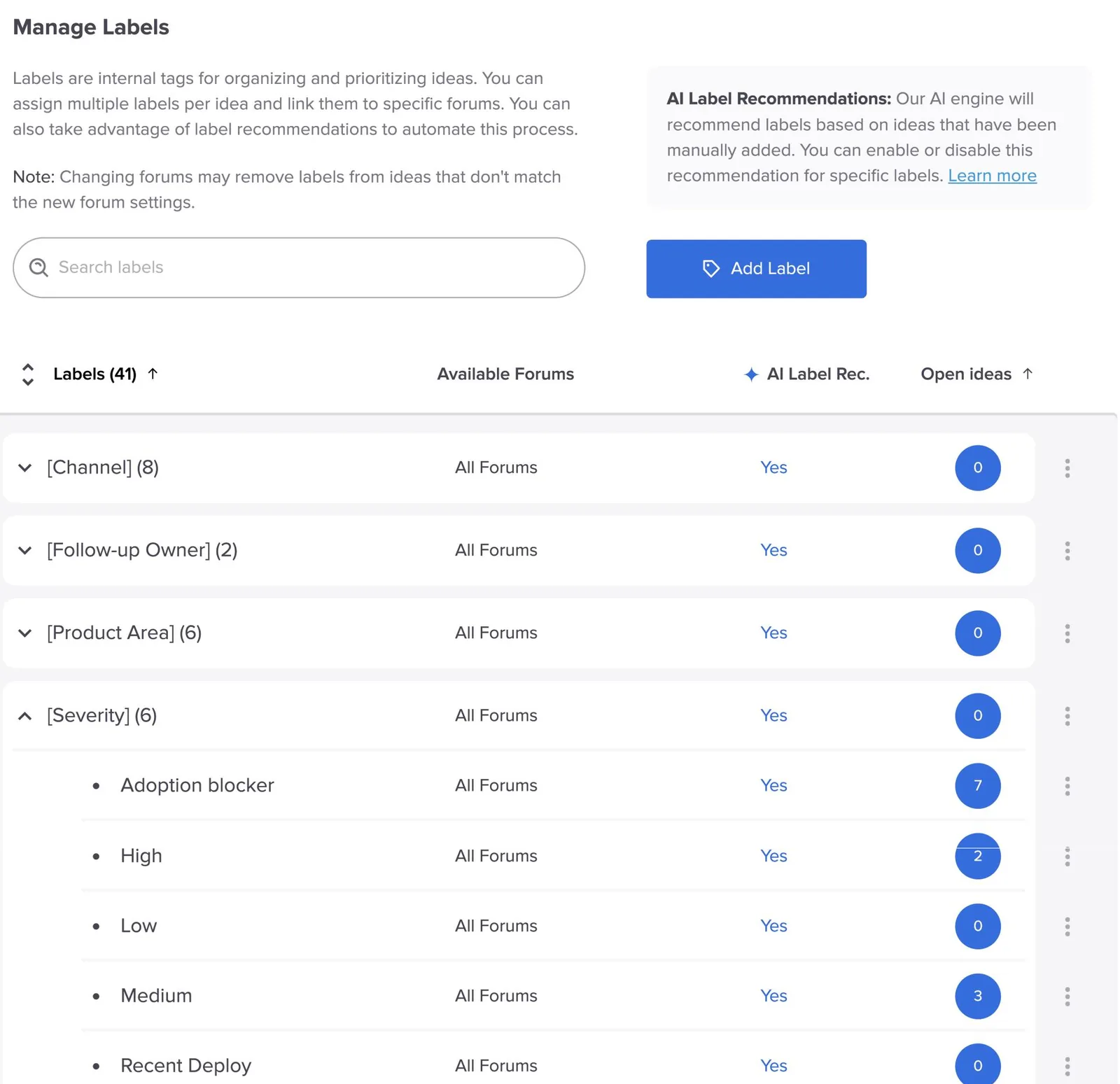
Labels can be nested up to three levels, shown as Parent > Child. Use a parent for each kind, such as Severity, and children for its values, such as High, Medium, and Low. Grouped labels are easier to find, filter, and keep consistent.
Labels can be limited to certain forums. A label set to specific forums can only be applied to ideas in those forums. Leave it on All Forums unless it truly belongs to one area.
Keep the list healthy
- Agree on names before you create them. Labels are shared by your whole team, so one naming convention avoids near-duplicates.
- Give the list an owner. Only people who can change settings can create, rename, or delete labels, so one owner keeps it tidy.
- Retire what nobody filters by. If a label hasn't been applied or filtered on in a quarter, rename it into something useful or delete it.
Label recommendations
With the AI Label Recommendations add-on, UserVoice suggests labels for new and updated ideas based on how your team has already labeled similar ones.
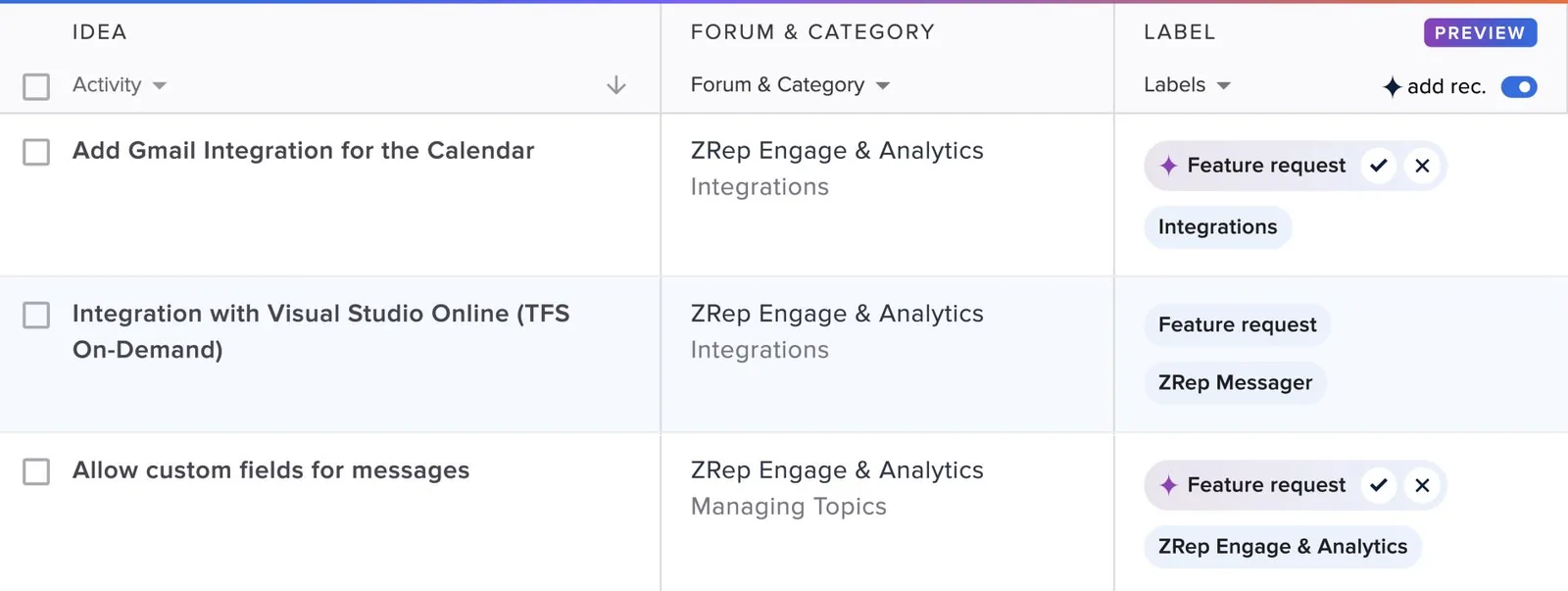
- It only suggests. Nothing is applied until someone on your team accepts it.
- It learns from your labels. A label needs at least five ideas before recommendations start, so apply new labels by hand first.
- It skips workflow tags. Labels that describe your process, such as a sprint or priority, aren't recommended.
- You choose which labels it uses. Turn recommendations on or off for each label on the Manage Labels page.
Clear names make better recommendations. A label called Performance is easier to match than one called Perf-2. Specific child labels, such as Integrations > Slack, get recommended over broad parents.
What not to encode
Some things look like labels or categories but already have a better home. Using the right tool keeps your taxonomy small and your data accurate.
| Don't make a label or category for | Use instead |
|---|---|
| Customer type, plan, or company size | Account data from your CRM, and segments |
| Revenue or deal size | The revenue and accounts behind each idea |
| Where an idea stands | Public and internal statuses |
| Who owns an idea | The idea owner, set by hand or per category |
| How important it is to customers | Importance ratings |
| Context collected on the form | Custom questions, scoped to the forums where they apply |
| A planned piece of work | A feature on your roadmap, with ideas linked to it |
If it changes on its own, it isn't a label. Revenue, status, and account details update from their own sources. A label copy of them goes stale.
An example taxonomy
A software company with a web app, a mobile app, and a beta. Its Sales, Success, and Support teams capture feedback into the same forums customers use.
| Forum | Access | Categories |
|---|---|---|
| Web app | Public | Reports and dashboards, Integrations, Notifications, Account and billing, Other |
| Mobile app | Public | iOS, Android, Offline mode, Other |
| Beta program | Private, by invitation | One category per area being tested |
Labels shared across all three
| Parent | Children |
|---|---|
| Type | Feature request, Improvement, Bug |
| Theme | Onboarding, Performance, Accessibility |
| Severity | High, Medium, Low, Adoption blocker |
| Source | From sales, From support, From customer success |
Changing it later
Your taxonomy will change as your product does. Know what each change does before you make it.
| Change | What happens |
|---|---|
| Move ideas to another forum | Votes, comments, feedback, and status move with them. The category clears unless you pick one in the new forum. The move can be undone. |
| Delete a category | You choose a category to redirect its ideas to. If you skip it, they become uncategorized. |
| Rename a category or label | Every idea keeps it, under the new name. |
| Limit a label to certain forums | The label is removed from ideas in other forums. |
| Delete a label | It is removed from every idea, along with any labels nested under it. This can't be undone. |
Merge categories by deleting with a redirect. There is no separate merge. Delete the category you no longer need and redirect its ideas to the one you're keeping.
Review it once a year. Look for categories nobody picks, labels nobody filters by, and forums that split votes for the same need.
Try it with your AI assistant
1 of 4 prompts in the PDFAttach the PDF to Claude, ChatGPT, or another assistant, then paste:
Using the UserVoice guide I attached, help me design forums, categories, and labels for [product]. Ask me about our customers, product areas, and teams first, then propose a taxonomy in the guide's format.
Three more prompts and the checklist are in the full guide. Get it by email →
Read next
Get the full guide
We'll email you the 12-page PDF. It adds two things that aren't on this page: