Portal Design – Make It Yours
Make the portal feel like part of your product, with your brand, your home page, and custom HTML, CSS, and JavaScript.
On this page
Your portal is where customers come to share ideas and see what you've done with them. Making it look and feel like your product builds trust and brings people back. This guide covers what you can change, planning a feedback home, the custom code boxes and where each one appears, building a home page with Liquid, styling with CSS, adding JavaScript safely, and testing before you launch.
What you can change
Most teams start with the basics and add custom code only when they want the portal to match their product closely. Custom code, white labeling, and your own domain depend on your plan.
| Change | Where | Needs code? |
|---|---|---|
| Site title and welcome message | Web portal, Site text | No |
| Logo and colors | Web portal, Appearance and features, General | No |
| Home page, or go straight to a forum | Appearance and features, Homepage | No |
| Remove “Powered by UserVoice” | Appearance and features, Enable White Labeling | No |
| Your own address, like feedback.yourcompany.com | Web portal, Domain name, Domain alias | No |
| Header, footer, home page, styles, and scripts | Appearance and features, HTML/CSS/Javascript | Yes |
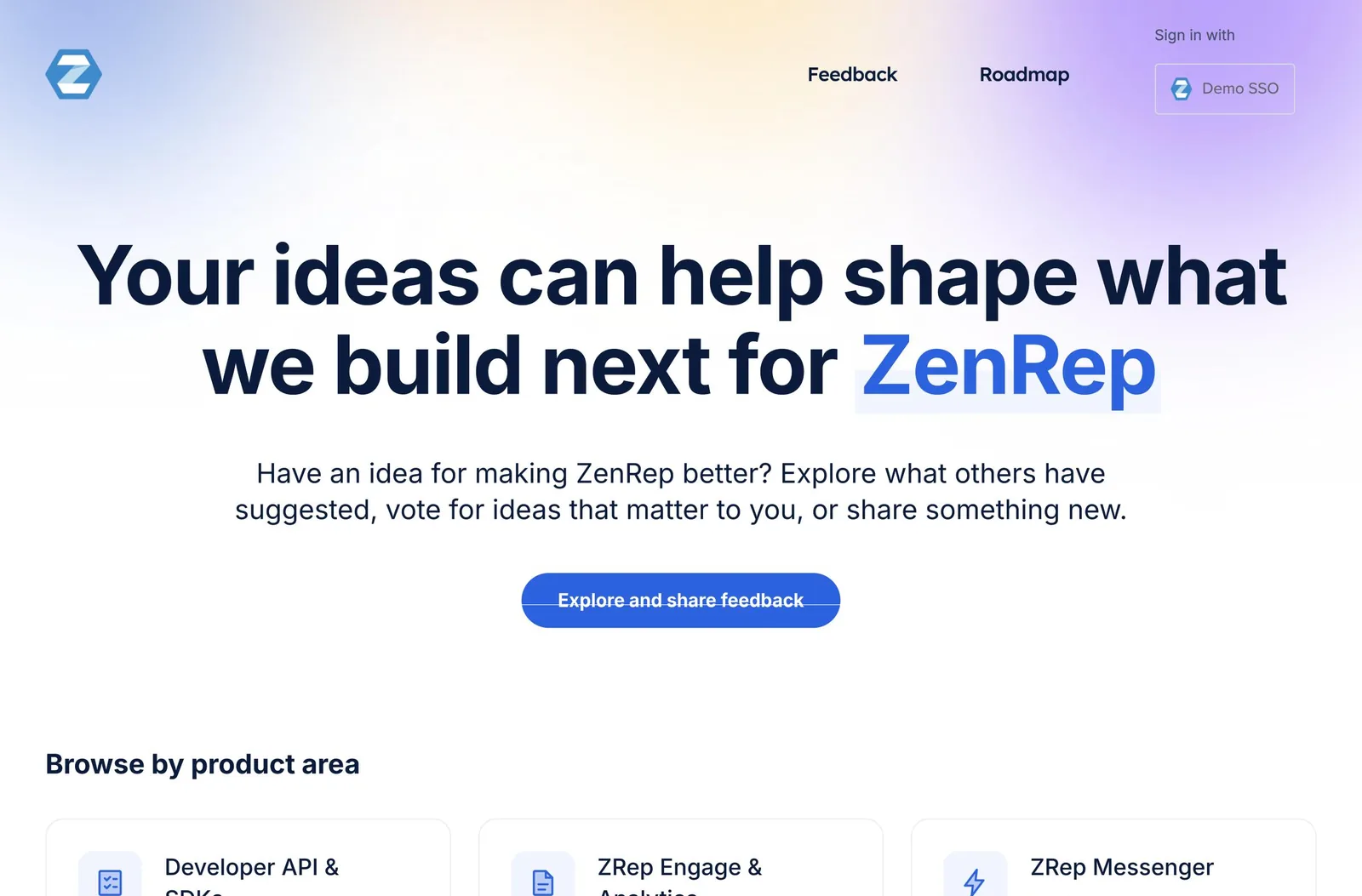
Plan your feedback home
A good feedback home answers three questions in the first screen: what is this, what can I do here, and does anything happen when I do?
A clear heading and a search box, so customers find an existing idea before posting a new one.
Recently updated ideas and a public roadmap prove that ideas go somewhere.
One line on how often you review ideas, and what the statuses mean.
Match your product's header, fonts, and colors, so the portal feels like part of it.
Do and don't
- Use your product's fonts and colors, and keep text contrast high.
- Link back to your product and your help center.
- Keep the page fast: small images, one or two fonts.
- Hide the search box or the way to post an idea.
- Promise dates or features in the home page copy.
- Rebuild UserVoice's own idea list or voting from scratch.
Turn on custom code
Custom code lives in one place: the HTML/CSS/Javascript tab of the portal's design settings.
- In Settings, open Web portal, then Appearance and features, and select Edit.
- Open the HTML/CSS/Javascript tab, and tick Enable custom HTML/CSS/Javascript. Confirm that you accept the risks of custom JavaScript.
- Fill in the boxes you need. Leave the header and footer blank to keep UserVoice's defaults.
- Save. Changes are live for every visitor right away.
There's no preview. Saving publishes immediately. Build and test your code somewhere else first, and make changes at a quiet time.
You can go back one step. The tab shows when the design last changed and by whom. Revert last custom change restores the previous version. Keep your own copy of every box, too, so you can go back further.
The custom code boxes
Each box fills one part of every portal page. All of them accept Liquid, UserVoice's template language.
| Box | Where it appears | Use it for |
|---|---|---|
| HEAD | Inside the page's head | Fonts, a favicon, and verification tags |
| HEADER | Top of every page | Your product's navigation and logo. Leave blank for the default header. |
| HOME PAGE | The portal's home page | Your feedback home: welcome, search, forums, and roadmap |
| ABOVE SIDEBAR and BELOW SIDEBAR | Around the sidebar on forum and idea pages | Short notes, such as how you review ideas |
| FOOTER | Bottom of every page | Links to your product, help center, and policies. Leave blank for the default. |
| Custom CSS | Every page | Styles for everything above, and for UserVoice's own pages |
| JAVASCRIPT SNIPPETS | End of every page | Small scripts, such as analytics, in their own script tags |
Script and style tags in HTML boxes are removed. Put styles in Custom CSS and scripts in the JavaScript box. Everything else in the HTML boxes is kept as you wrote it.
Build a home page
The HOME PAGE box is a Liquid template. Mix your own HTML with UserVoice's data and building blocks. Leave it blank to keep the default home page.
A simple feedback home
<section class="hero">
  <h1>{{ site.title }}</h1>
  {{ site.body_html }}
  {{ render_sidebar }}
</section>

<section class="forums">
  {% for forum in site.forums %}
    <a class="forum-card" href="{{ forum.url }}">
      <h2>{{ forum.name }}</h2>
      <p>{{ forum.suggestions_count }} ideas</p>
    </a>
  {% endfor %}
</section>

{% if site.portal_roadmap_enabled %}{% render_roadmap %}{% endif %}| Building block | What it gives you |
|---|---|
| {{ render_sidebar }} | UserVoice's search, so customers find existing ideas |
| {{ render_user }} | Sign-in, or the signed-in person's menu |
| {% render_roadmap %} | Your public roadmap. Add a roadmap's ID to choose one. |
| {% render_suggestion idea %} | UserVoice's own idea card, with voting |
Data you can use
| Variable | Includes |
|---|---|
| site | Title, welcome message, logo, colors, forums, default forum, and recently updated ideas |
| forum | Name, link, prompt, categories, ideas, and counts |
| idea (from a list) | Title, link, status, category, and comment count |
| current_user | The signed-in person's name and picture, when someone is signed in |
Show recently updated ideas, with a fallback when there are none
{% if site.recently_updated_suggestions.size > 0 %}
  <h2>{{ "Recently updated" | translate }}</h2>
  {% for idea in site.recently_updated_suggestions %}
    <a href="{{ idea.url }}">{{ idea.title }}</a>
    <span class="status">{{ idea.status_name }}</span>
  {% endfor %}
{% endif %}- Translate your own text with the translate filter, so translated portals read naturally.
- Show different content to signed-in and anonymous visitors by checking current_user.
- Keep the skip link working: give your main content the ID start-of-content.
Personal details are available to your code. current_user includes the visitor's email address. Don't display it or send it anywhere without a reason.
Style it with CSS
Your CSS loads before UserVoice's own styles, so make your selectors more specific instead of reaching for !important.
Examples
/* Win with specificity, not !important */
.site3 .uv-home-page .hero { padding: 48px 0; }
.site3 .uv-forum-page .uvIdeaTitle { font-size: 20px; }

/* Different looks for signed-in and anonymous visitors */
.uv-no-user .hero .welcome { display: block; }| Target | Classes |
|---|---|
| The whole portal | .site3, on the html element |
| A type of page | .uv-home-page, .uv-forum-page, .uv-suggestion-page, .uv-profile-page |
| One forum | .uv-forum-123 (the forum's ID) |
| Visitors | .uv-user, .uv-no-user, .uv-user-SSO, .uv-user-admin |
| Language and direction | .uv-locale-fr, .uv-direction-rtl |
- Prefer page and visitor classes over UserVoice's inner component classes, which can change.
- Load fonts with a link tag in HEAD, not with @import.
- Keep CSS small, under about 40 KB. It loads on every page.
Add JavaScript carefully
JavaScript runs on every portal page, for every visitor. Treat it like code on your own website.
A small, safe snippet
<script>
  // Runs on every portal page. Keep it small, and don't rely on
  // UserVoice's internal markup, which can change.
  document.querySelectorAll('.footer-year').forEach(function (el) {
    el.textContent = new Date().getFullYear();
  });
</script>- Wrap scripts in script tags in the JavaScript box.
- Escape Liquid: the box is read as Liquid first, so wrap code that uses double curly braces in raw and endraw tags.
- Use only scripts you trust. With custom code on, the portal doesn't restrict where scripts load from.
- Don't depend on UserVoice's internal markup. Use your own elements, or the page and visitor classes.
A broken script can break the portal. Test every change in another environment first, and keep the previous version ready to restore.
Beyond the portal
Custom code changes portal pages only. A few other places need their own settings to match your brand.
| Place | How to brand it |
|---|---|
| Emails to customers | General, Email Communications: colors, logo, and sending domain |
| The widget | Settings, Widgets: its own colors and position |
| Share previews and emails | Use the uploaded logo, so keep it current even if your header uses another |
| Browser tab icon | Add a favicon link in the HEAD box |
| “Powered by UserVoice” | Enable White Labeling, which covers the portal and emails |
| Your address | Domain alias, with a CNAME record from your DNS team |
Test before you launch
Check every kind of page, as every kind of visitor, before you call it done.
| Check | How |
|---|---|
| Every page type | Home, a forum, an idea, a profile, search results, and sign-in |
| Every visitor | Signed out, signed in, and signed in through single sign-on |
| Private forums | The access-denied page uses your header and footer too |
| Phones | A narrow window, about 375 pixels wide |
| Contrast | Body text at least 7:1, and smaller muted text at least 4.5:1 |
| Keyboard | Tab through the page, and use the skip link |
| Languages | Translated text, and right-to-left languages if you support them |
Know how to roll back. Untick Enable custom HTML/CSS/Javascript to return to the standard design at once, or select Revert last custom change.
Try it with your AI assistant
1 of 4 prompts in the PDFAttach the PDF to Claude, ChatGPT, or another assistant, then paste:
Using the UserVoice guide I attached, write Custom CSS that matches our brand: [colors, fonts, link to our site]. Follow the guide's advice on specificity and size.
Three more prompts and the checklist are in the full guide. Get it by email →
Read next
Get the full guide
We'll email you the 13-page PDF. It adds two things that aren't on this page: