Triage a Feedback Backlog with the UserVoice Agent
A 20-minute weekly pass: merge, place, label, assign, and update, with your approval on every change.
On this page
The UserVoice agent is the AI built into UserVoice for triaging customer feedback in about 20 minutes a week: find and merge duplicate feature requests, categorize and tag ideas, assign owners, and update statuses. Each change is one plain-language request, and the agent shows a confirmation card before anything runs, then a receipt after. Merges and public status updates email supporters only when you ask. Only admins with full access to feedback can have the agent make changes.
How the weekly pass works
The UserVoice agent is the AI built into UserVoice for triaging customer feedback. Triage is the small, regular job that keeps your backlog useful, often run by product operations. In the agent, each step is one question and, when you want a change, one card to confirm.
| Step | What you do | Time |
|---|---|---|
| 1. See what came in | List the week's new ideas and the ones with no owner or category | 3 min |
| 2. Merge duplicates | Find ideas that ask for the same thing, and merge them | 5 min |
| 3. Place, label, and assign | Move ideas to the right category, add labels, and assign owners | 7 min |
| 4. Update statuses | Set internal statuses, and post public updates where they're due | 5 min |
Nothing changes until you confirm. When you ask for a change, the agent shows a card with exactly what will happen. Select the card's button to make the change, or Cancel. After it runs, the card turns into a receipt with links to the ideas it changed.
Before you start
The agent works as you, with your permissions. Check three things before your first pass.
Anyone who can see feedback can ask the agent questions. Only admins with full access to feedback can have it merge, label, assign, or update.
Categories, labels, and statuses that already exist. The agent uses your names; it doesn't invent new ones.
The people ideas get assigned to. Name them the way they appear in UserVoice.
The same 20 minutes each week. A backlog triaged weekly never needs a big cleanup.
See what came in
Open the agent from where you already work, then ask directly. Select Triage under the question box for starter prompts.
| From | How |
|---|---|
| The idea grid | Select Ask UserVoice above the grid. The agent opens beside it and knows which ideas are in view, so you can ask about “these ideas”. |
| Selected ideas | Select ideas in the grid, then Ask UserVoice in the quick actions. The agent works on just the ideas you picked. |
| AI Tools | Open AI Tools → Ask UserVoice for a full-page chat and your past conversations. |
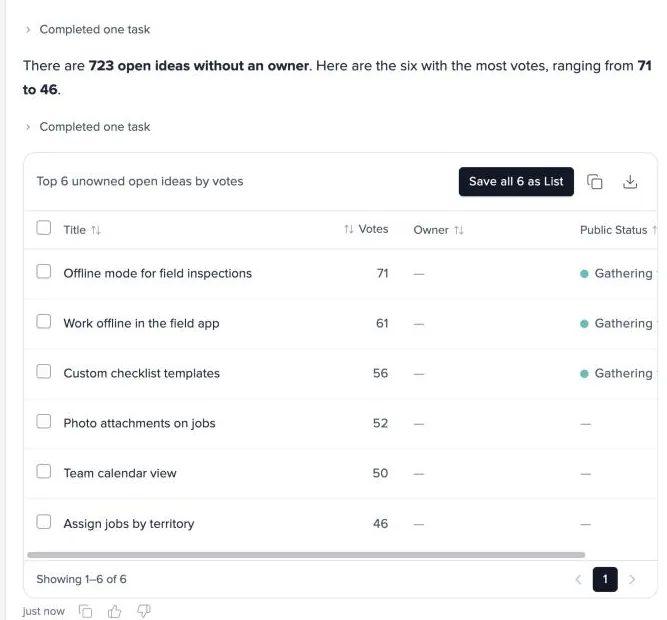
Save the week's queue as a list. Select Save as List on the answer, then work through the list in the idea grid, with Ask UserVoice open beside it.
Merge duplicates
Duplicate feature requests are the most common mess in a backlog: customers describe the same need many ways. The agent's idea search matches meaning as well as words, so it finds duplicates that a keyword search misses.
- The card names the idea you keep and the ideas merged into it. Votes and feedback move to the kept idea.
- The kept idea inherits the merged ideas' labels, lists, and owner. The card warns you before you confirm.
- Supporters aren't emailed unless you ask. Say “and email the supporters” if you want them told, and the card shows how many will get the email.
- A merge can be undone from the idea's page in UserVoice, not by the agent.
Merge into the idea with the most history. Keep the idea with the most votes, feedback, or the clearest title. If the best title is on a merged idea, ask the agent to retitle the kept idea afterward.
Place, label, and assign
Categorizing and tagging ideas by hand is slow. Work from the last answer: ask for the change in plain language, check the card, and confirm.
| Ask | The card shows |
|---|---|
| Move these ideas to the [category] category. | Each idea, its current category, and the new one |
| Add the label [label] to the open ideas about [topic]. | Which ideas get the label |
| Assign every unowned idea in [category] to [owner]. | The new owner and each idea |
Update statuses
Ideas have an internal status for your team and a public status your customers see. Statuses keep your roadmap current. The agent can set both, and it treats them differently.
| Internal status | Public status | |
|---|---|---|
| Who sees it | Your team | Everyone who can see the idea on your portal |
| Emails | None, unless you ask it to notify your team | Team members who captured feedback on the idea are always emailed. Supporters only when you ask. |
| Message | None | Your status's template message, unless you ask for another or none |
| Can it be undone? | Yes, set another status | No. The post and any emails are final. |
Read the card before you post a public status. It lists who will be emailed and the message they'll get. A public update can't be taken back, so check both before you confirm.
What each change does
Every change is made under your name, like a change you make yourself. Here is what each one sends.
| Change | Who hears about it | How to undo it |
|---|---|---|
| Merge ideas | Supporters, only if you ask | Unmerge from the idea's page |
| Move, retitle, or relabel | No one | Ask the agent to change it back |
| Assign an owner | No one | Assign another owner |
| Internal status | Your team, only if you ask | Set another status |
| Public status | Team members who captured feedback; supporters if you ask | Can't be undone |
| Save as a list | No one | Edit or delete the list |
| Mark as spam or delete | A deleted idea's author may get a removal notice | Restore from the idea's page |
Your conversations are your own. Past chats are saved under Recents for you to rename or delete. They aren't shared with anyone else.
Read next
Get the full guide
We'll email you the 10-page PDF. It adds one thing that isn't on this page: